Scientia for Slack
Slack tells you what happened. Scientia remembers what was decided — and why.
Scientia captures decisions right in your Slack threads and turns them into structured, evidenced records you can review, approve, and revisit. Slack is the first capture surface. Scientia is the durable decision system.
Native Slack integration · currently available to approved pilot workspaces.
What Scientia is not
Scientia is not a general-purpose assistant or a thread summarizer, and it does not replace Slack. It does one thing deliberately: capture the decisions that would otherwise be lost in the scroll, and keep them structured and reviewable over time.
How Slack capture works
From a thread to a decision you can trust later.
1 · Capture
Start capture in the thread
Run /scientia capture or mention @Scientia in any thread. Scientia grounds the draft in the available Slack thread and surfaces when the context is insufficient — it does not invent a decision that was not discussed.
2 · Structure
A structured decision draft
Scientia turns the discussion into a structured decision record: the question being decided, the evidence, the rationale, and an honest confidence read — not a summary of the chatter.
3 · Review
Decide in Slack
A Decision Card appears in the thread. Approve promotes it to your Decision Log; Request Changes opens a modal to capture what needs to change. Review actions respect your workspace's access controls.
4 · Remember
Durable decision memory
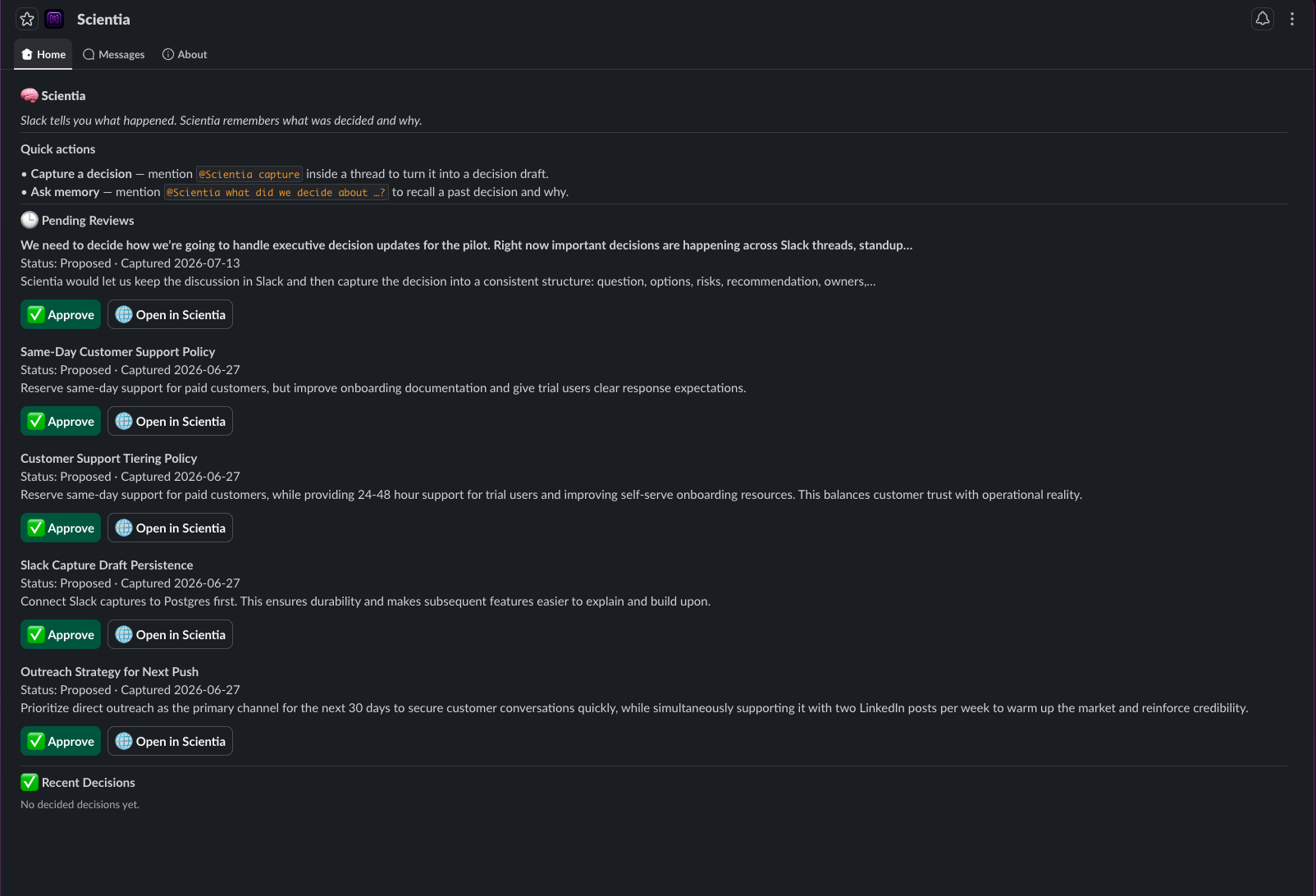
App Home keeps Pending Reviews and Recent Decisions in reach, and decision-memory search answers “what did we decide about X?” — honestly, including when there is no answer on record.
The Decision Card
The decision, its evidence, and one place to act.
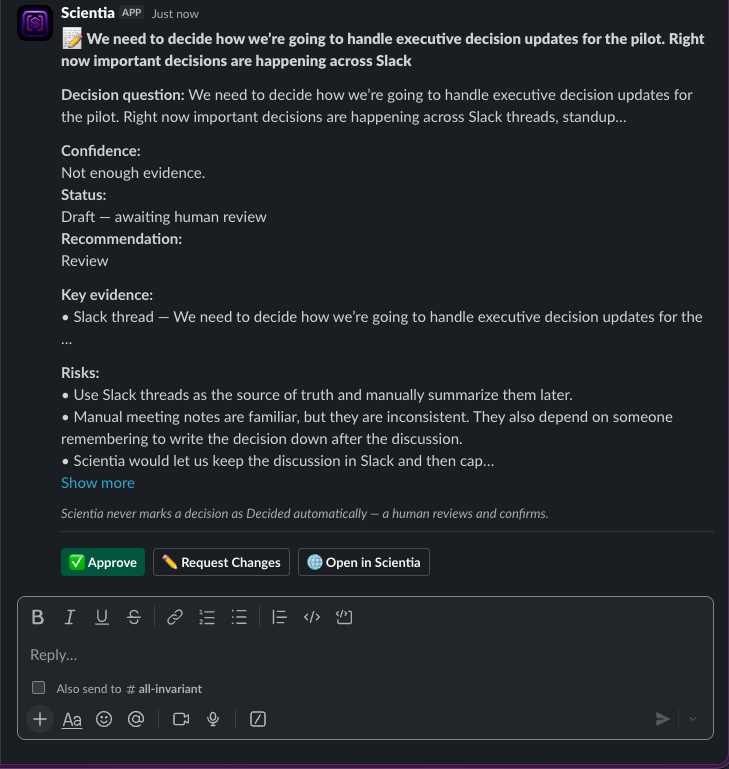
Scientia posts a Decision Card back into the thread so the whole team sees the same structured record:
- The decision question, status, and an honest confidence read
- Supporting evidence and rationale drawn from the thread
- Approve, Request Changes, and Open in Scientia actions
Review & approval
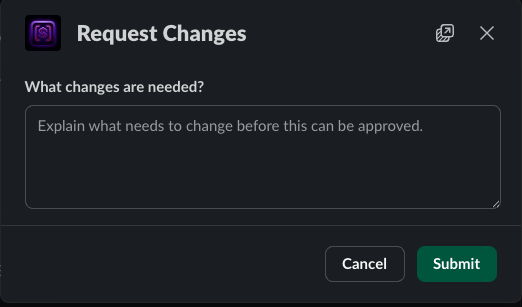
Approve, or ask for changes — without leaving Slack.
Approve promotes the decision into your Decision Log. Request Changes opens a modal to record exactly what needs to change; the decision stays out of the official log until it is resolved. Review actions respect your workspace’s access controls.
Honest by design
A captured decision is not a decided one. Until it is approved, it stays clearly marked and out of the official Decision Log, so the record only ever contains calls the team actually stood behind.
App Home & decision memory
The decisions that matter, still in reach.
App Home keeps Pending Reviews and Recent Decisions one click away. And when someone asks “what did we decide about this?”, decision-memory search answers from the record — and says so honestly when there is nothing on file rather than inventing an answer.
Security & privacy for Slack
Connected carefully. Isolated by workspace.
Workspace connection
Scientia connects to your workspace through Slack's standard authorization and requests only the permissions it needs: to receive your commands and mentions, read the thread you point it at, and post the Decision Card back.
Encrypted installations
Each workspace connection is stored in a database with its Slack bot token encrypted at rest (AES-256-GCM). If a stored token cannot be read, Scientia fails closed and skips the send rather than reaching into another workspace.
Per-workspace isolation
Every request is resolved to a single workspace. An unrecognized workspace is not served. One workspace never sees another workspace's threads, decisions, or tokens.
Verified and governed
Inbound Slack requests are signature-verified before anything runs. Decision records are stored and governed inside Scientia's protected application environment, with a reviewable history.
Removable
Uninstalling the app or revoking its access is handled: the workspace connection is revoked and retained for audit rather than left active.
Availability
Currently available to approved pilot workspaces.
Scientia for Slack is connected through a guided setup for approved workspaces. There is no public Slack Marketplace listing and no one-click public install yet, and org-wide Enterprise Grid installation is not supported at this stage.
Slack FAQ
Is Scientia available in the Slack Marketplace?
Not today. Scientia for Slack is currently available to approved pilot workspaces through a guided connection. There is no public Slack Marketplace listing and no one-click public install yet.
What can Scientia read?
Only the thread you point it at when you run a capture. It grounds the decision draft in that available thread and tells you when the context is insufficient instead of guessing.
Where do our decisions live?
Decision records are stored and governed inside Scientia's protected application environment. The Decision Card in Slack links back to the full record.
Does it support org-wide (Enterprise Grid) install?
Not yet. Connections are per workspace today, with strict isolation between workspaces.
Bring decision capture to your Slack workspace.
Approved pilot workspaces are connected through a guided setup. Tell us about the decisions your team keeps losing.